

Last year, I vibecoded a plugin as a joke for a talk at Devoxx Poland. We have also used the same progress bar at other conferences in Poland since…
As we were speaking in Poland again at GeeCON, I wanted to reinstall the plugin.
Unfortunately it turns out that the original project no longer builds. This might be because the version of Gradle it uses is too old (7.x instead of the current v9), because of changes in the IntelliJ platform, or both.
Fortunately, I could ask my colleague Jakub Chrzanowski for help.
Restart from scratch
As it turns out, it was easier to start a project from scratch with the help of a new template.
There are currently 2 ways ways to start a new project:
- From the Plugin generator website
- From inside the IDE – This option is available if you have the Plugin Devkit installed in your IDE and will have the same result as creating a project from the website, as they share the same generator.

Since I figured it might be easier to start from scratch, I had created a new project using the Plugin generator website. To update the project, we copied the `src` folder from the old project to the new project.
Building and running
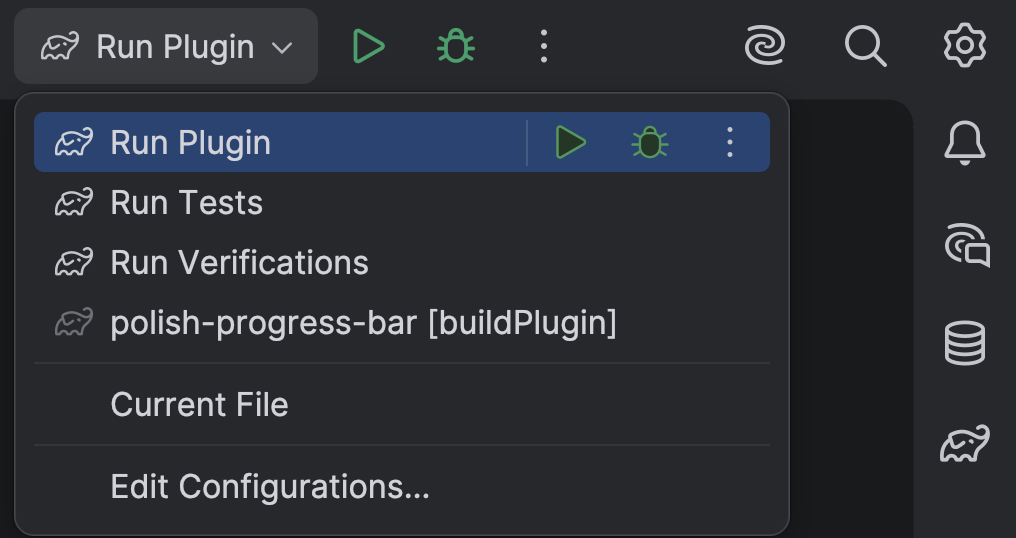
The template project comes with several run configurations that you can use to build and verify your project:
- Run Plugin will run the plugin, opening a sandbox IDE where you can try your plugin.
- Run Verifications which will run verifications on the previous, current and upcoming versions of our IDEs (currently: 2025.3, 2026.1 and 2026.2)
- Run tests will run any tests. (I am ashamed to say this project has none. In my defense, this is a simple plugin and the correct behaviour can be easily verified by running it in the sandbox IDE).
Code cleanup
Jakub also helped me with cleaning up some code. In addition, I did some cleanup myself, partially based on results from the verifications. Restarting the project was a good opportunity to make it a little nicer, and actually care about the code quality a little.
Installing the plugin
After building the plugin, I installed it on my IDE.
The plugin is not published to the JetBrains MarketPlace, as I am not sure another progress bar is really needed. You can find the code here. If you want to build and install it yourself, you can find the instructions in the README.
Thanks to Jakub Chrzanowski for his help with the plugin and this blogpost. ❤️
One thought on “Updating a vibe-coded plugin: The Polish progress bar”
Comments are closed.