Voxxed Days Amsterdam 2026: An absolute blast!

Just over two weeks ago, I was at Voxxed Days Amsterdam. This was the second edition of the conference, and this year it was two days instead of one!

Day 1: Wednesday, April 1

Opening the day

As a member of the Program Committee, I got to open day 1 together with Michel Schudel. During the opening we introduced the speakers, the program committee, and the community reviewers. This year we had around 650 proposals, and some of us (including myself) reviewed each and every one of them! We also remind people to use the app to rate the talks, as that helps both speakers and organisers to know how talks are received. We use this information to improve our talks and the program!

dD_1103

Like last year, we had rotating keynotes; which meant that the keynote speakers would do their keynote twice (once in each room) rather than have an overflow room where people watch the keynotes on a screen. One of the keynotes on day 1 was Baruch Sadogursky‘s Never Trust a Monkey! Can We Trust AI-Generated Code? Baruch’s takes are always interesting, so I’d recommend checking it out.

Speaking with Piotr Przybył about modern Java

Right after the opening, it was time for Piotr Przybył and I to take the stage. We present our talk Learning modern Java the playful way, which we updated for Java 26. During this talk we show you how to update Java code from Java 8-11 to modern Java, using some of our favorite new Java language features, including Records, Stream Gatherers, Structured Concurrency, and for the Java 26 version we also added Lazy Constants. We do so using a demo application, and of course some silly jokes!

We aim for the session to be educational and entertaining. Fortunately, someone who attended our session stopped by to tell us that was exactly what they thought of our session, just as we were taking pictures for a social media post.

Foojay podcast

Frank Delporte was back again this year to interview speakers for the Friends of OpenJDK (Foojay.io) podcast. We discussed some topics dear to my heart: Java and reading code.

dD_2327

You can catch all of the interviews below:

Other talks

During the day I also managed to catch a few other sessions:

10 Things I Hate About Java by Adele Carpenter

Adele is an amazing speaker, and this talk was no exception. I’d been wanting to see this talk ever since I first heard about it! In this talk, Adele goes over some of the decisions that were made during the design of the language, and how those resulted in some of the features that Java has (or doesn’t have). The talk was well-researched and the delivery was amazing. The title of the talk refers to the movie title “10 things I hate about you”. Adele ended the talk with a poem about Java, similar to the one Julia Stiles recites during the movie, and it was brilliant!

Building AI Agents with Spring & MCP by James Ward and Josh Long

It is always fun to see what Josh and James are up to with Spring and AI. Even if you’ve seen them before, they are always entertaining. And in this session they also briefly mentioned Mellum by JetBrains.

What Sorcery is This? How software uses Dark Patterns to manipulate users by Rachel Appel

Another talk I’d been wanting to see for a while. Even though Rachel is my colleague, we don’t usually go to the same conferences, as we are in different ecosystems. Rachel showed how easy it is to manipulate users through software design, with some absolutely appalling examples of dark patterns. This talk is a good reminder of the responsibility we have as developers.

Language Games by Eli Holderness

This talk combines philosophy, language and communication in a way I cannot reproduce; you’ll just have to watch it yourself! Due to technical difficulties, Eli’s slides were not always shown properly. They managed to work around that quite well by describing the image that should have been displayed. It was a master class in communication.

Despite being able to catch some talks, there were also many I missed. For example, my other colleague Anton Arhipov was speaking at the same time as Rachel. And, as much as I would like to, unfortunately I still haven’t managed to clone myself so I can attend multiple sessions at the same time… 😔

dD_2122

Also, there is more to do on a conference day than attending talks; I also had regular work to do in between, like writing the Featured Content for Java Annotated Monthly that was about to be published.

Day 2: Thursday, April 2

Opening the day

On day 2, I opened the conference together with Ko Turk. Again we introduced the speakers, program committee and community reviewers, and I got to announce Iulia Feroli 🤩 as one of the keynote speakers. Her keynote Building my own (accurate!) Spotify Wrapped was a good way to start the day.

In fact, her keynote inspired Devoxx founder Stephan Janssen to add a Devoxx wrapped to the Devoxx Mobile companion app.

Other talks

On the second day, I didn’t manage to catch so many talks, as I also had other things to do. But the ones I did see were again very good!

How I built my own Intelligent Robot Arm from Scratch by Iulia Feroli

In addition to her keynote, Iulia gave a talk about her physical AI adventures, bringing real hardware on stage. This was a very inspiring session; I am always amazed with how creative some people are in ways that are different from myself.

Iulia is definitely someone to watch! You can follow her YouTube channel Back to Engineering if you want to learn more.

5.5 prompt injection techniques in 15 minutes by Brian Vermeer

A last minute addition to the program (we are lucky to have so many great speakers in the Netherlands!), Brian talks about some much needed security awareness in the age of AI.

Hallway track

And of course, some of the best parts of a conference happen in the hallway. It was great to catch up with friends and meet new people across both days. Among other things, I had a great conversation with Ronald Dehuysser about what working as a Developer Advocate looks like (spoiler: it’s more than speaking at conferences!). One of the things I like about this job is speaking to our users, getting their feedback and seeing how we can help them better. Ronald happened to have some relevant feedback that we discussed.

dD_4188
dD_0790

Thanks!

Many thanks to everyone who helped make this such a great event: the speakers for their great sessions, volunteers for helping out, sponsors for making this possible and of course all the attendees! 

All recordings are available in the playlist on YouTube

Photos by Dimitris Doutsiopoulos 🫶 are available for day 1 and day 2.

All photos in this post (except for screenshots) by Dimitris Doutsiopoulos.

dD_3010

Voxxed Days Zürich 2026: Another great event!

Almost three weeks ago, I had the pleasure of speaking at Voxxed Days Zürich. This was my third time at this conference, and also my third Swiss Voxxed Days this year (which will be relevant later!).

Speaker dinner

The speaker dinner the evening before the conference is always a good time to catch up with friends and meet other speakers. Good food and drinks are a bonus.  

Because the restaurant was a little loud (maybe because it was filled with speakers…), some of us ended up outside.

Photographer Dimitris Doutsiopoulos took advantage of this to take some beautiful pictures, like this one of Paco van Beckhoven and me, which my colleague Jason Torres pointed out looks like a still from a movie. (It does, doesn’t it?)

Welcome

The conference day started with a welcome by Federico Yankelevich and Patrick Baumgartner.

Patrick created a beautiful animation for this year’s edition. And I have to say I am rather partial to these colors. They even got the steps of the cinema to match!

During the session they called out the Voxxed Days Switzerland Champions. Apparently I was one of six speakers who spoke at all three Swiss Voxxed Days conferences: Voxxed Days Ticino, Voxxed Days CERN and Voxxed Days Zürich. As I am a sucker for vanity metrics, I really appreciated this callout. 😂

Speaking with Andres Almiray about Maven

At Voxxed Days Zürich this year, I had the pleasure to do a new(ish) talk with Andres Almiray: “Getting more out of Maven”. This was only the second time we did this talk (the first time was at JavaLand). Unfortunately we had some trouble connecting my macbook to the screen, which threw us off a little…

During the talk we discussed several tips for using Maven in IntelliJ IDEA. We showed using the Maven wrapper to increase reproducibility of the build, and the enforcer plugin to see where your build breaks. We explained Maven lifecycle and goals, as well as how inheritance works, and more. And of course, we showed some useful IntelliJ IDEA features for working with Maven and dependency management, the dependency analyzer to find conflicts in dependencies, inspections to show you when dependencies have known vulnerabilities and finally the Vulnerable API inspection which can show you whether you are actually using the vulnerable API of a known vulnerability. 

And of course, our session also included some custom memes that we created for this talk. If you want to see all the memes, you can find them in this repo.

Despite the initial technical trouble, overall our session went well. We got some positive feedback, and I had a nice conversation later with some of the attendees about the topic of our talk.

Other talks

During the day I managed to catch the following talks:

Agentic AI Patterns by Kevin Dubois and Mario Fusco

This was a great talk to stay up to date with everything AI. Kevin and Marco did also have some technical trouble, when there was some interference with audio from another room, which was quickly fixes by the conference.

Are We Ready For The Next Cyber Security Crisis Like Log4Shell? by Soroosh Khodami

Soroosh showed us how easy it can be to get compromised and different ways to prevent this.

Supercharge your JVM performance with Project Leyden and Spring Boot by Moritz Halbritter

Moritz showed us how Project Leyden can help you speed up your Spring Boot applications. Mandatory watching for anyone using Java and Spring Boot!

Hallway track

And I also managed to take advantage of the hallway track, again to catch up with people. 

Thanks!

Many thanks to Federico Yankelevich, Patrick Baumgartner and team for organizing another great event! I hope to be back again in the future.

You can find the Voxxed Days Zürich photo album here and the playlist here.

Credit

All photos on this page by Dimitris Doutsiopoulos. 🫶
Tips and tricks to use Java 25 in IntelliJ IDEA

IntelliJ IDEA supports new Java versions from day one. Several features were added to make working with Java 25 language features in IntelliJ IDEA easier.

New project

Create a new project in IntelliJ IDEA.

You can use the New Project Wizard to create a new project in IntelliJ IDEA. If you select the option to Add sample code, IntelliJ IDEA will add sample code to your project, containing a class with a main method.

If you select IntelliJ as your Build system, set JDK to 25, the sample code will be a compact source file and instance main method, introduced in Java 25.

Compact source file

Create a compact source file in IntelliJ IDEA.

Compact source files were introduced in Java 25. To create a compact source file, right-click the Project tool window (or press ⌘N (macOS) / Alt+Ins (Windows/Linux)) and select New | Java Class. In the New Java Class popup, select the option Compact source file.

This compact source file is created in the root directory of your project, even if you create it from another package. IntelliJ IDEA automatically adds an instance main method void main() to the file.

Java Compact File

Create a compact source file in IntelliJ IDEA.

To create a Java Compact File, introduced in Java 25, right-click the src/main/java directory in the Project tool window and select New | Java Compact File. IntelliJ IDEA will provide a default name for the file, so your thought process is not disrupted when you want to quickly try something out. IntelliJ IDEA automatically adds an instance main method void main() to the file.

Convert compact source file to class

Convert a compact source file to a class in IntelliJ IDEA.

Java 25 introduced the concept of implicit classes or compact source files. We can convert an implicit class to a regular class as needed. Invoke Context Actions by pressing ⌥⏎ (macOS) / Alt+Enter (Windows/Linux) and select Convert an implicitly declared class of a compact source file into a regular class.

The reverse is also possible, should you prefer to use an implicit class at any point. To do so, use the quick-fix Convert into compact source file.

New live templates for main methods

Create an instance main method using a live template.

IntelliJ IDEA has some new live templates to add a main method to an implicit class, either with or without arguments: mainmainapsvmpsvma. Using the live templates psvm or main inside a compact source file will add the new main method, while they will continue to add the classic main method inside a class, as you can see in the preview.

Add arguments

Add args to your main method.

The new void main() method, introduced in Java 25, does not need String[] args. However, should you decide to use the args in your code, IntelliJ IDEA will help you by also adding them to the main method. Type args and press  (macOS) / Enter (Windows/Linux) to select args from code completion.

Live templates for simple IO

Add simple IO methods using live templates.

Java 25 introduces simple IO methods, such as IO.println() and readln() to make interacting with the console more convenient. IntelliJ IDEA introduces two new live templates to use these methods: iop for println() and ior for readln().

In addition, there are quick-fixes available to convert IO.println() to System.out.println(), and vice versa. Invoke Context Actions ⌥⏎ (macOS) / Alt+Enter (Windows/Linux) on the method and select the option Replace with System.out.println() or Replace with IO.println().

Add static import for simple IO

Add a static import for simple IO methods.

Java 25 introduces simple IO methods, such as IO.println() and readln() to make interacting with the console more convenient. To use these methods in a compact source file, you don’t need to add an import. However, you can add a static import the java.lang.IO class if you prefer. Invoke Context Actions ⌥⏎ (macOS) / Alt+Enter (Windows/Linux) on the method and select the option Add on-demand static import for java.lang.io.

Module Import

Using module import in IntelliJ IDEA.

Java 25 introduces module imports. When adding a module import, use Jump Down to see the contents of the module. When using Optimized Imports, IntelliJ IDEA will automatically remove any imports that are added by the module import. If you prefer to use single class imports, invoke Context Actions ⌥⏎ (macOS) / Alt+Enter (Windows/Linux) and select Replace with single class imports.

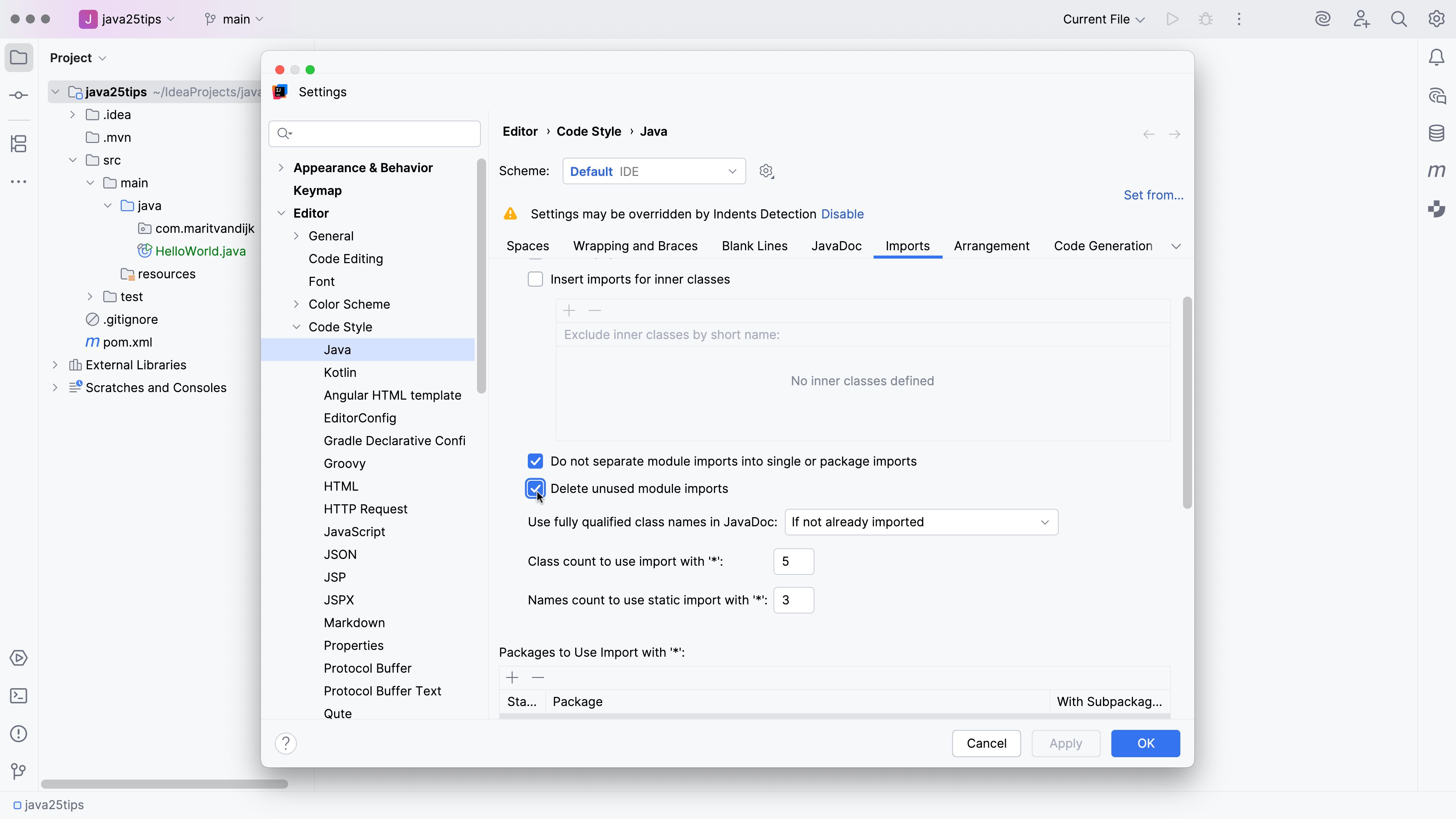
If desired, it is possible to delete unused module imports when using Optimized Imports. To configure this option, open Settings | Editor | Code Style | Java and go to the Imports tab. Select the option Delete unused module imports. When this option is selected, Optimized Imports will remove unused module imports.

Delete unused module imports

Conclusion

Support for Java language features in IntelliJ IDEA makes it easy to adopt and work with new Java language versions.